
Swift (iOS, macOS, watchOS, tvOS)

Analytics for
Swift Apps

Privacy-First. Simple. Real-Time.

Aptabase is an Open Source alternative to Google Firebase Analytics for Swift Apps

1. Register

Signing up takes less than a minute.

2. Instrument

Use the Swift SDK for Aptabase to instrument your app. You're in total control of what events to track.

Here's an example 👇

Aptabase.shared.trackEvent("play_music", with: [
  "name": "Here comes the sun"
])

Full install and setup steps in the quickstart below .

3. Explore

That's it! You'll now see the data on your dashboard as the events come through from your app.
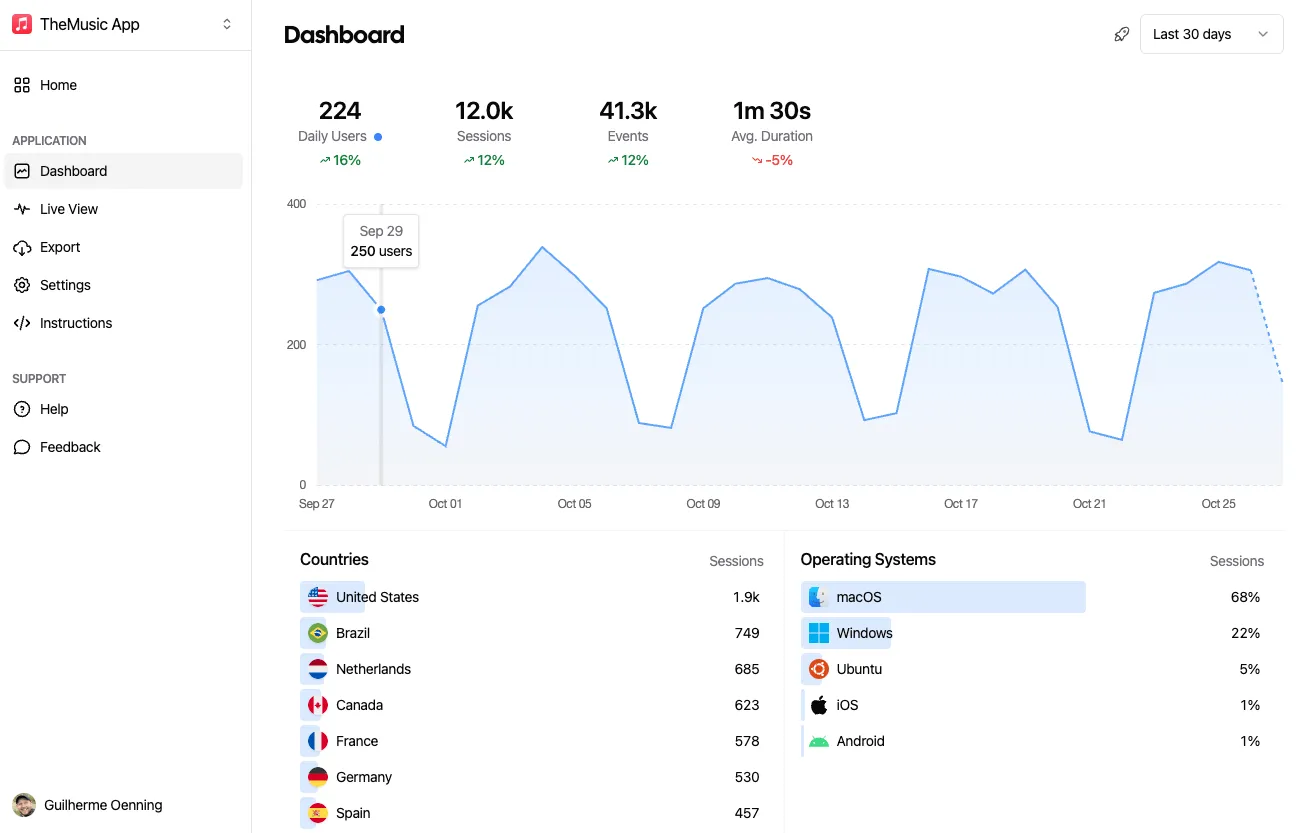
Aptabase Dashboard Screenshot

Use Cases

Why add Analytics to your Swift Apps?

You can't improve what you don't measure. Aptabase helps you get valuable insights from your Swift Apps in a privacy-friendly manner.

Feature Usage

Are you aware of the features in your app that users engage with most frequently? What configurations that majority of your users prefer? Gaining insights into these areas allows you to make well-informed decisions on future focus points for enhancing your Swift app's user experience.

Location and Language

Understanding the geographical distribution of your user base can significantly inform the decision to localize your Swift app, thereby enhancing its global accessibility and visibility on the Apple App Store.

Which OS versions do my users have?

Aptabase efficiently gathers data such as the names of operating systems such as iOS, iPadOS, macOS, etc., and their respective versions. This valuable insight enables you to concentrate on crafting enhanced user experiences tailored to the most widely used OS and versions.

Quickstart

Add Aptabase to your Swift Apps

Install the Swift (iOS, macOS, watchOS, tvOS) SDK, initialize it with your App Key and track your first event. Get the App Key from the dashboard's Instructions menu — keys look like A-EU-*, A-US-*.

1. Install

Package: Aptabase (Swift Package Manager)

Add https://github.com/aptabase/aptabase-swift.git via SPM or Xcode

2. Initialization

import SwiftUI
import Aptabase

@main
struct ExampleApp: App {
    init() {
        Aptabase.shared.initialize(appKey: "<YOUR_APP_KEY>")
    }

    var body: some Scene {
        WindowGroup {
            MainView()
        }
    }
}

3. Track events

import Aptabase

Aptabase.shared.trackEvent("app_started")
Aptabase.shared.trackEvent("screen_view", with: ["name": "Settings"])

Platform notes

How the SDK behaves

README on GitHub → · Build Modes → · All SDKs reference →

Privacy front and center

Analytics without the legal headaches

In the realms of user tracking and privacy, Aptabase employs a unique strategy to secure the privacy of your users.

Truly anonymous data
Sessions tracked by Aptabase are completely anonymous and untraceable. The data we collect is not linked to any identifiable individual.
Goodbye fingerprinting!
Aptabase does not use device identifiers, cookies, fingerprinting nor long-term user identification.
Open Source
Aptabase is 100% open source so you can inspect the code and make sure we're not doing anything shady :)
100% Data Ownership
It's your data, you own it. We don't sell it and we don't use it. It's yours and yours alone. You can even export it at any time!
EU or US data residency, or bring your own
You can decide where your data is stored. Choose between our EU or US data centers, or host your own servers!
GDPR, CCPA and PECR compliant
Aptabase does not collect any personal data to help you keep your application compliant with the latest strict privacy regulations.

Start free, pay when you grow

Free up to 20,000 events/month. Paid plans from $10/month for 200,000 events up to $450/month for 50,000,000 events. No overage fees.

See all plans →

Where would you prefer to host your data?

European Union Germany United States Virginia

We typically advise selecting the region nearest to the majority of your users' locations. However, if your user base is global and dispersed, opt for the region that is geographically closest to your own location.